Webix Pricing in 2026: Licence Cost, Webix Grid and Free Options
Webix pricing is easier to read than most commercial UI libraries: the prices are on the page, the licences are perpetual and there is no per seat subscription. The hard part is choosing between five suite packs, a separate Webix Grid product with its own price list, and a free GPL edition that leaves out a long list of grid features. This guide lays out what each option costs, what it includes and where the limits are, so you can match it to the spec you were given.
Every price below was read from webix.com/licenses, the Webix Grid licensing page and the Webix licence agreements on November 23, 2026, with the pack configurator and support toggles clicked through in a browser. Prices are in US dollars and change, so confirm on the Webix site before you buy. We build Tabulator, a free MIT licensed data grid, so we cover it as an alternative near the end and keep the Webix facts to what Webix publishes.
The short answer
- Webix PRO starts at $848 for a Custom pack: the 114 core widgets, one project, up to 2 developers and a year of standard support. It cannot be used in a SaaS product.
- The ready made packs are $2,499 (Company), $3,999 (DevTeam) and $9,499 (Unlim), and each includes all 15 complex widgets such as Pivot, Spreadsheet, Gantt and Kanban.
- Webix Grid is sold separately for teams that only need the data grid: $749 (Developer), $2,199 (Application), $3,599 (Business) and $8,399 (Unlim).
- All licences are perpetual. You pay once, get one year of updates and support, and keep using the versions released in that year. Renewing while active costs 30% less.
- SaaS needs a bigger licence. The entry Custom pack and the entry Webix Grid Developer plan exclude SaaS use.
- Webix Standard is free under GPLv3, but it has 73 of the 114+ widgets, no complex widgets, and its DataTable lacks header menus, rich filters, area selection, row and column spans, column grouping and sub rows. GPL also means sharing your application's source code.
- Need a grid with no licence fee at all? Tabulator is MIT licensed and free for commercial use, including SaaS.
Webix PRO pricing: the four packs
Webix (made by XB Software) sells its full widget library, Webix PRO, in four packs. The headline on the pricing page sums up the model: "One-time purchase. One year of updates. Perpetual commercial license."
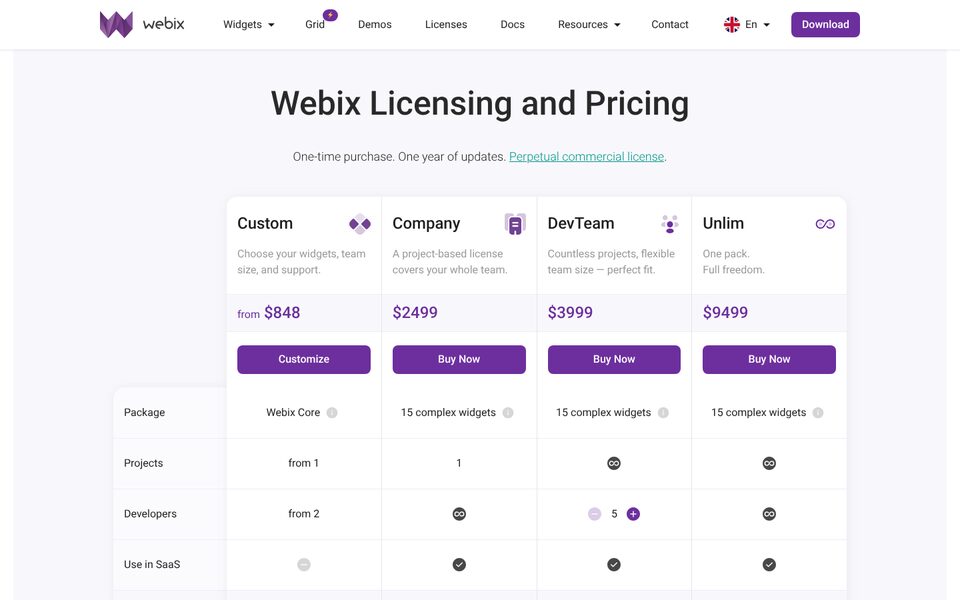
| Pack | Price | Widgets | Projects | Developers | SaaS | Support |
|---|---|---|---|---|---|---|
| Custom | From $848 | Webix Core (114 widgets), complex widgets extra | From 1 | From 2 | Only on the 5 developer option | Standard, Priority +$599 |
| Company | $2,499 | Core plus 15 complex widgets | 1 | Unlimited | Yes | Standard, Priority +$599 ($3,098) |
| DevTeam | $3,999 | Core plus 15 complex widgets | Unlimited | 5, then $499 per extra developer | Yes | Standard, Priority +$599 ($4,598) |
| Unlim | $9,499 | Core plus 15 complex widgets | Unlimited | Unlimited | Yes | Priority included |
Custom pack
The Custom pack is the cheapest way into Webix PRO and the only one you build yourself. Its configurator starts at $848, made up of $549 for the 114 standard widgets and $299 for a year of standard support. That base covers one project and up to 2 developers, and the pricing table marks it as not usable in SaaS.
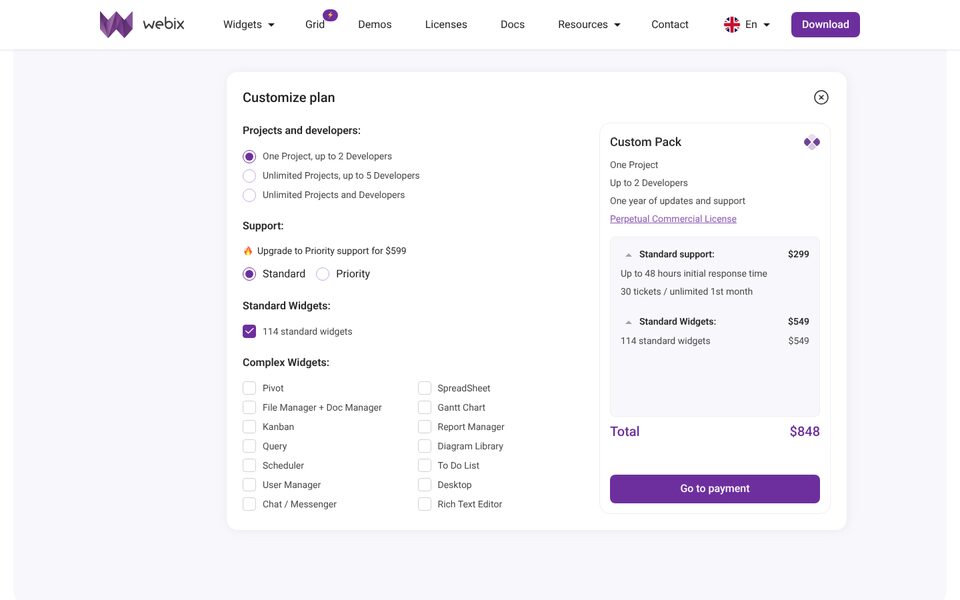
Three things change the price:
- Team size. Switching to "Unlimited Projects, up to 5 Developers" raised the widget line to $2,199 and the total to $2,498, and the summary then said "Can be used in SaaS products". A third option, "Unlimited Projects and Developers", is listed in the dialog.
- Priority support. Upgrading costs $599, taking the base pack to $1,447. Priority adds unlimited tickets, a 24 hour initial response, emergency bug fixes and an integration audit on request.
- Complex widgets. Each one is an add on. In our run, File Manager plus Doc Manager listed at $199, and Gantt, Chat and Diagram at $499 each. The configurator then applied an automatic discount, so adding Gantt took the total from $1,347 to $963, and adding File Manager took it to $914.
Company, DevTeam and Unlim
The three fixed packs all include the 15 complex widgets: Pivot, Kanban, Scheduler, Spreadsheet, File Manager, Doc Manager, Query, User Manager, Chat, Gantt, Report Manager, Rich Text Editor, Desktop, To-Do List and Diagram. They differ by how many projects and developers they cover.
- Company ($2,499) is project based: one project, any number of developers. Good for a company with one product and a growing team.
- DevTeam ($3,999) covers unlimited projects for 5 developers. The pricing table has a seat counter: each extra developer added $499 in our run (6 developers $4,498, 10 developers $6,494).
- Unlim ($9,499) removes both limits and includes Priority support, with a 24 hour response, unlimited tickets, emergency bug fixes and an integration audit.
Webix Grid pricing (the standalone data grid)
If you only need the data grid, Webix also sells Webix Grid, a standalone build of its DataTable with its own site and price list. The tagline on its licensing page is "Pay for the Grid, Deploy Without Limits".
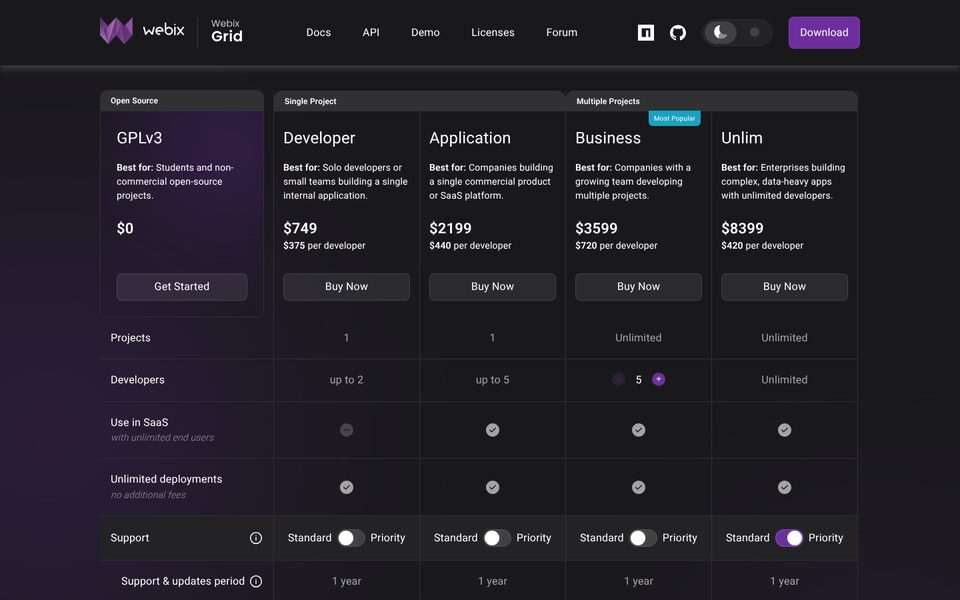
| Plan | Price | Projects | Developers | SaaS | Best for (Webix's words) |
|---|---|---|---|---|---|
| GPLv3 | $0 | n/a | n/a | Only if your app is GPL | Students and non-commercial open source projects |
| Developer | $749 | 1 | Up to 2 | No | Solo developers or small teams building a single internal application |
| Application | $2,199 | 1 | Up to 5 | Yes | Companies building a single commercial product or SaaS platform |
| Business | $3,599 | Unlimited | 5 (adjustable) | Yes | Companies with a growing team developing multiple projects |
| Unlim | $8,399 | Unlimited | Unlimited | Yes | Enterprises with unlimited developers |
Per the Webix Grid FAQ, priority support is a $599 add on for Developer, Application and Business, and included with Unlim. Standard support is 30 tickets a month (unlimited in the first month) with an initial response within 48 hours. Every paid plan is a perpetual licence with one year of updates, and renewing is described as "30% more cost-effective than purchasing a new license".
Two details are worth reading closely:
- A project is tied to a domain. The FAQ says a project "is tied to a specific domain and allows for unlimited deployments", including different environments and subdomains. If your product runs on customer domains, ask Webix how that is counted before you choose Developer or Application.
- Nothing breaks when the licence expires. The FAQ says there are "no watermarks, visual limitations, or forced purchase prompts" after expiry. You lose updates and support, not the grid.
Webix Grid or the full Webix PRO?
For a grid only spec, Webix Grid is the cheaper path: $749 versus $848 for the entry tier, and $2,199 versus $2,498 for 5 developers with SaaS rights. Webix PRO makes sense when you also need its forms, layouts, charts or complex widgets such as Pivot and Spreadsheet, because the Company pack bundles all of them for $2,499.
What the free Webix Standard (GPL) edition leaves out
Webix Standard is free under GPLv3. Webix publishes a side by side Standard vs PRO comparison, and the gap is wider than most free tiers.
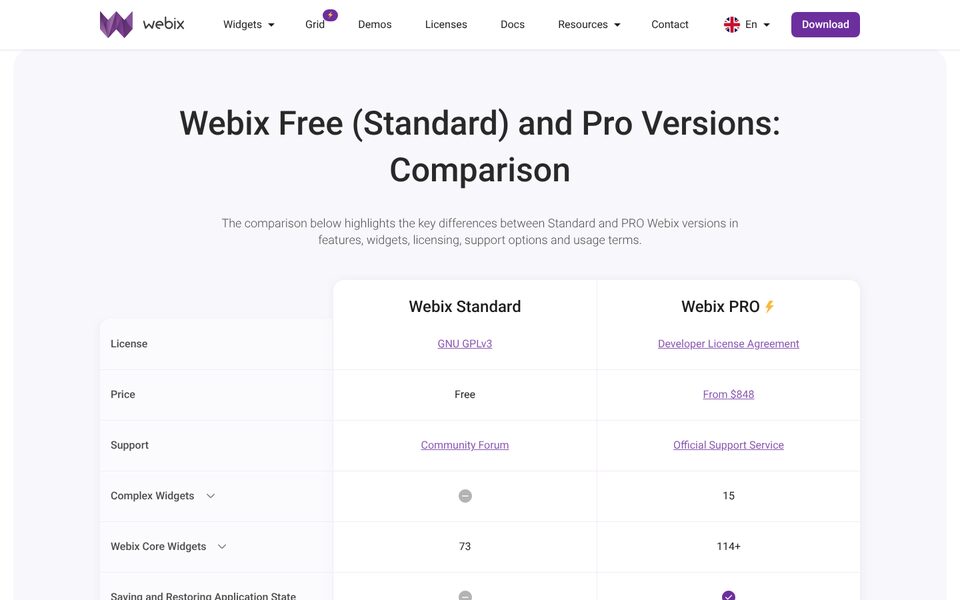
According to that table, Webix Standard has:
- 73 core widgets instead of 114+. PRO only widgets include Multiselect, Multicombo, DateRangePicker, GridSuggest, RangeSlider, Dashboard, GridLayout, Portlet, TreeMap, Excel Viewer, PDF Viewer and Barcode.
- None of the 15 complex widgets. No Pivot, Spreadsheet, Gantt, Kanban or Scheduler.
- A DataTable "with a standard feature set". The PRO DataTable adds advanced filtering, area selection, colspan and rowspan, grouped columns, a header menu, subrows and subviews, and vertical or rotated headers.
- No saving and restoring of application state and no extra styling options.
- 10 predefined locales instead of 300+.
- Community forum support only.
The Webix Grid GPL vs Pro page gives a finer grained list for the grid. Its Pro only rows are: header menu and extended header menu, multiselect editor, rich and multiselect filters, date range filters, Excel style filter, filter configuration, area selection, frozen rows, rowspans and colspans, column grouping, subrows and subviews. Sorting, basic filters, inline editors, clipboard, pagination, frozen columns, validation, drag and drop, sparklines and state saving are in both.
Can you use Webix GPL in a commercial product?
Only if you are willing to license your application under GPLv3. Webix's FAQ says "under the GPLv3 license, you must provide your application's source code to users, allowing them to view and modify it", and that a project with commercial or closed source components needs a commercial licence. The download form asks you to agree to "License your application under GPLv3".
Two more conditions from the developer licence agreement are easy to miss:
- You cannot switch later. The agreement states: "you can not develop a programe under GPLv3 and later convert to a commercial license." Decide before you start building.
- The trial is 30 days. Webix PRO and Webix Grid Pro both offer a 30 day trial with every Pro feature.
Teachers and students can ask Webix for a free Student Licence.
How Webix licences work
Who counts as a developer
Webix defines a developer as "a freelancer or an employee who works directly with Webix code (API, CSS, etc.)". People who only use the finished application do not count. A licence can be reassigned to another developer once per month, or when a developer leaves the company.
What counts as a project
For the suite packs, a project is one of: a commercial product you sell as a packaged solution, a custom solution for a single client, or an internal system, where "any number of applications built for use within one company" count as one project. Agencies building for several clients should look at DevTeam or Unlim, since each client solution is a separate project.
Renewals and updates
Each purchase includes one year of updates (major and minor) and support. Webix says minor releases ship every 2 to 3 months and a major release once a year. After the year ends you keep using every version released while you were active. Renewing before expiry earns a 30% discount. The current release on November 23, 2026 is Webix 11.4.
Paying for Webix
Webix sells through the reseller PayPro Global, which accepts cards, PayPal and many local methods. Wire transfers carry a $7 manual processing fee and purchase orders $10. Quotes are available by contacting Webix and arrive within one business day.
Webix pricing compared with other grid vendors
Webix is one of the cheaper commercial options because it charges once rather than per developer per year. Here is how the entry prices compare, using figures from our other pricing guides:
| Product | Entry price | Model | Source |
|---|---|---|---|
| Tabulator | $0 | MIT, free for commercial use | Licence |
| Webix Grid | $749 (2 developers, 1 project) | Perpetual, 1 year of updates | This guide |
| Webix PRO | $848 (2 developers, 1 project) | Perpetual, 1 year of updates | This guide |
| DHTMLX Grid | $749 (1 developer) | Perpetual, 1 year of updates | Sencha alternatives |
| Kendo UI | $799 per developer per year | Subscription | Kendo UI alternatives |
| Syncfusion Grid SDK | $959 per developer per year | Subscription | Syncfusion alternatives |
| AG Grid Enterprise | From $999 per developer | Perpetual, 1 year of updates | AG Grid pricing |
| Sencha Ext JS Pro | $1,499 per developer per year | Subscription | Sencha alternatives |
The bigger difference shows up with a team. Five developers building one SaaS product pay $2,199 for Webix Grid Application or $2,499 for the Webix Company pack. The same five on per developer subscriptions pay about $4,000 to $7,500 a year. Webix's own renewals are optional, at a 30% discount, if you want updates after year one.
The Sencha Ext JS alternatives guide compares Webix with Ext JS directly, since Webix is one of the most common replacements for it.
Is Webix worth the price?
Webix is a good fit when:
- You want a whole UI toolkit (layouts, forms, data widgets, charts) described as one JavaScript config, in the style of Ext JS.
- You need a complex widget such as Pivot, Spreadsheet, Gantt or Kanban from the same vendor as the grid.
- Your budget process prefers a one time purchase over a per developer subscription.
- You want a support contract with defined response times.
It is a weaker fit when:
- Your app is built in React, Vue, Angular or Svelte and you only need a table. Webix is a self contained framework with its own view model, so it sits beside your framework rather than inside it.
- The spec needs features that are Pro only in Webix (grouped columns, header menus, sub rows, frozen rows, multiselect filters) and there is no budget line for a UI component.
- Hiring matters. Webix's npm package had about 2,500 downloads in the week of November 16, 2026, against about 259,000 for
tabulator-tables, so fewer developers arrive knowing it. - The GPL edition is not an option for a closed source product, and you cannot switch from GPL to commercial mid project.
A free Webix alternative: Tabulator
Tabulator is an MIT licensed JavaScript data grid with no dependencies, no paid tier and no licence key. It is free for commercial and SaaS use by any number of developers, projects and end users. It works with plain JavaScript and with React, Vue, Angular and Svelte. Try it below: sort a column, edit a cell, page through the data.
The features Webix lists as Pro only in its grid are part of the free Tabulator build. This one configuration covers a header menu for showing and hiding columns, a multiselect header filter, a multiselect editor, block (area) selection with copy to Excel, a frozen row, grouped column headers with totals, and expandable sub rows. We ran it in Chromium against Tabulator 6.7.1 with no errors or warnings:
// header menu that shows and hides columns
const columnMenu = function () {
  return this.getColumns().filter(c => c.getField()).map(column => ({
    label: (column.isVisible() ? "✓ " : "   ") + column.getDefinition().title,
    action: e => { e.stopPropagation(); column.toggle(); },
  }));
};

const table = new Tabulator("#orders", {
  data: orders,                   // rows with optional _children arrays
  dataTree: true,                 // expandable sub rows
  dataTreeStartExpanded: false,
  frozenRows: 1,                  // keep the first row pinned while scrolling
  selectableRange: true,          // drag to select a block of cells
  selectableRangeColumns: true,
  headerSortClickElement: "icon", // sort from the arrow, select columns from the title
  clipboard: true,                // copy the selected range to Excel
  clipboardCopyRowRange: "range",
  height: 320,
  layout: "fitColumns",
  columnDefaults: { headerMenu: columnMenu },
  columns: [
    { title: "Customer", field: "customer", headerFilter: "input" },
    { title: "Region", field: "region",
      headerFilter: "list",
      headerFilterParams: { values: ["EU", "US"], multiselect: true },
      headerFilterFunc: "in" },
    { title: "Tags", field: "tags",
      editor: "list",
      editorParams: { values: ["urgent", "vip", "trial"], multiselect: true },
      formatter: cell => (cell.getValue() || []).join(", ") },
    { title: "Revenue", columns: [  // grouped column headers
      { title: "Q1", field: "q1", hozAlign: "right", bottomCalc: "sum" },
      { title: "Q2", field: "q2", hozAlign: "right", bottomCalc: "sum" },
    ]},
  ],
});
Here is how the Pro only rows from Webix's own comparison map to Tabulator:
| Feature | Webix Grid GPL | Webix Grid Pro | Tabulator (MIT) |
|---|---|---|---|
| Price for a closed source SaaS app | Not allowed | From $2,199 | Free |
| Header menu | No | Yes | Yes (menus) |
| Multiselect editor and filters | No | Yes | Yes (list editor, header filters) |
| Area (range) selection | No | Yes | Yes (range selection) |
| Frozen rows | No | Yes | Yes (frozen rows) |
| Grouped column headers | No | Yes | Yes (column groups) |
| Sub rows | No | Yes | Yes (nested data trees) |
| Sub views (detail panel under a row) | No | Yes | Yes, with a row formatter that renders nested content |
| Row grouping | Check its docs | Check its docs | Yes (grouping) |
| Cell rowspan and colspan | No | Yes | No. Column header groups only |
| Excel style filter popup | No | Yes | No built in popup. Header filters or a custom header menu |
| State saving | Yes | Yes | Yes (persistence) |
| Export | Check its docs | Check its docs | CSV, JSON, XLSX, PDF and HTML (downloads) |
| Virtual rendering for large data | Yes | Yes | Yes (virtual DOM) |
| Vendor support | Forum | Standard or Priority plan | Community, plus optional commercial support |
What Tabulator does not have: cell level rowspan and colspan, an Excel style filter popup out of the box, and the rest of the Webix toolkit (forms, layouts, Gantt, Kanban, Pivot). If you need those from one vendor, Webix PRO is built for it. If the spec is a fast, editable, filterable grid that ships in a closed source or SaaS product, Tabulator covers it at no cost. For pivot style reporting with Tabulator, see the JavaScript pivot table guide, and for nested rows the tree grid comparison, which also covers Webix TreeTable.
Other Webix alternatives
- DHTMLX Grid is the closest in style and price: a perpetual licence from $749 and a GPL v2 Standard edition. The Sencha alternatives guide has its current pricing.
- AG Grid has a large MIT Community edition, with grouping, tree data and Excel export in Enterprise. See AG Grid pricing and AG Grid alternatives.
- Kendo UI and Syncfusion are full suites sold per developer per year. See Kendo UI alternatives and Syncfusion alternatives.
For a broader view, the best JavaScript table libraries roundup compares the main free and paid grids with screenshots.
Frequently asked questions
How much does Webix cost?
As of November 23, 2026, Webix PRO costs from $848 for a Custom pack (114 widgets, 1 project, 2 developers), $2,499 for the Company pack, $3,999 for DevTeam and $9,499 for Unlim. The standalone Webix Grid costs $749, $2,199, $3,599 or $8,399. All are one time purchases with a perpetual licence and a year of updates.
Is Webix free?
Webix Standard and the Webix Grid GPL edition are free under GPLv3. That licence requires you to provide your application's source code to its users, and the free editions leave out the complex widgets and many grid features. Closed source and commercial products need a paid licence.
Is Webix open source?
Webix Standard is open source under GPLv3. Webix PRO and Webix Grid Pro are commercial. Paid licences include the source code, but you may not redistribute it.
Does the Webix licence expire?
No. The licence is perpetual. After one year you stop receiving updates and support, but you can keep using every version released during your active year. Renewing before expiry is 30% cheaper.
Can I use Webix in a SaaS product?
Yes, with the right licence. For Webix PRO you need Company, DevTeam, Unlim or a Custom pack with the 5 developer option. For Webix Grid you need Application, Business or Unlim. The entry plans in both price lists exclude SaaS.
What is the difference between Webix and Webix Grid?
Webix is the full UI library: 114+ widgets plus optional complex widgets such as Pivot and Gantt. Webix Grid is a standalone data grid product with its own site, documentation and cheaper price list, for teams that only need the table.
Is there a free alternative to Webix?
Yes. Tabulator is an MIT licensed JavaScript data grid that is free for commercial and SaaS use. It includes header menus, multiselect filters, range selection, frozen rows, grouped headers, tree data and export without a paid tier.
Get started with Tabulator
Install Tabulator from npm with npm install tabulator-tables, or follow the quickstart guide. The examples page shows every feature above running live, and the framework guides cover React, Vue, Angular and Svelte.