Handsontable Pricing in 2026: Licence Cost and Free Options
Handsontable pricing is hard to pin down because, as of November 2026, the pricing page does not show a price. There is a 45 day trial, an Enterprise plan with a "Contact sales" button, and a note that the licence is priced by the number of end users. This guide explains what that means for your budget, what you can still use for free, and what to ask before you build a spec around it.
Every licence fact below was read from Handsontable's own pricing page, FAQ, support page and documentation on November 12, 2026. Terms change, so confirm on their site before you buy. We build Tabulator, a free MIT licensed grid, so we cover it as an alternative near the end and keep the Handsontable facts to what Handsontable publishes.
The short answer
- Handsontable does not publish a price. Every commercial licence, subscription or perpetual, is sold through the sales team as a quote.
- The licence is priced by end users. Handsontable's FAQ says the price depends on the number of end users of the applications you build with it.
- There is no free tier for commercial work. The free
non-commercial-and-evaluationkey covers teaching, research, evaluation and testing. It does not cover production use tied to commercial activity. - The trial lasts 45 days and includes every feature plus help from technical support.
- Handsontable has not been open source since 2019. The last MIT licensed version is 6.2.2, released in December 2018.
- HyperFormula, the formula engine, is licensed separately under GPLv3 or a commercial licence.
- Need an Excel style grid with no licence key? Tabulator is MIT licensed and free for commercial use.
How Handsontable pricing works
Handsontable (the company is Handsoncode, based in Poland) sells two products. Handsontable DataGrid is the spreadsheet style grid component. HyperFormula is the calculation engine that powers formulas, inside the grid or on its own in Node.js. A Bundle licenses both under one agreement.
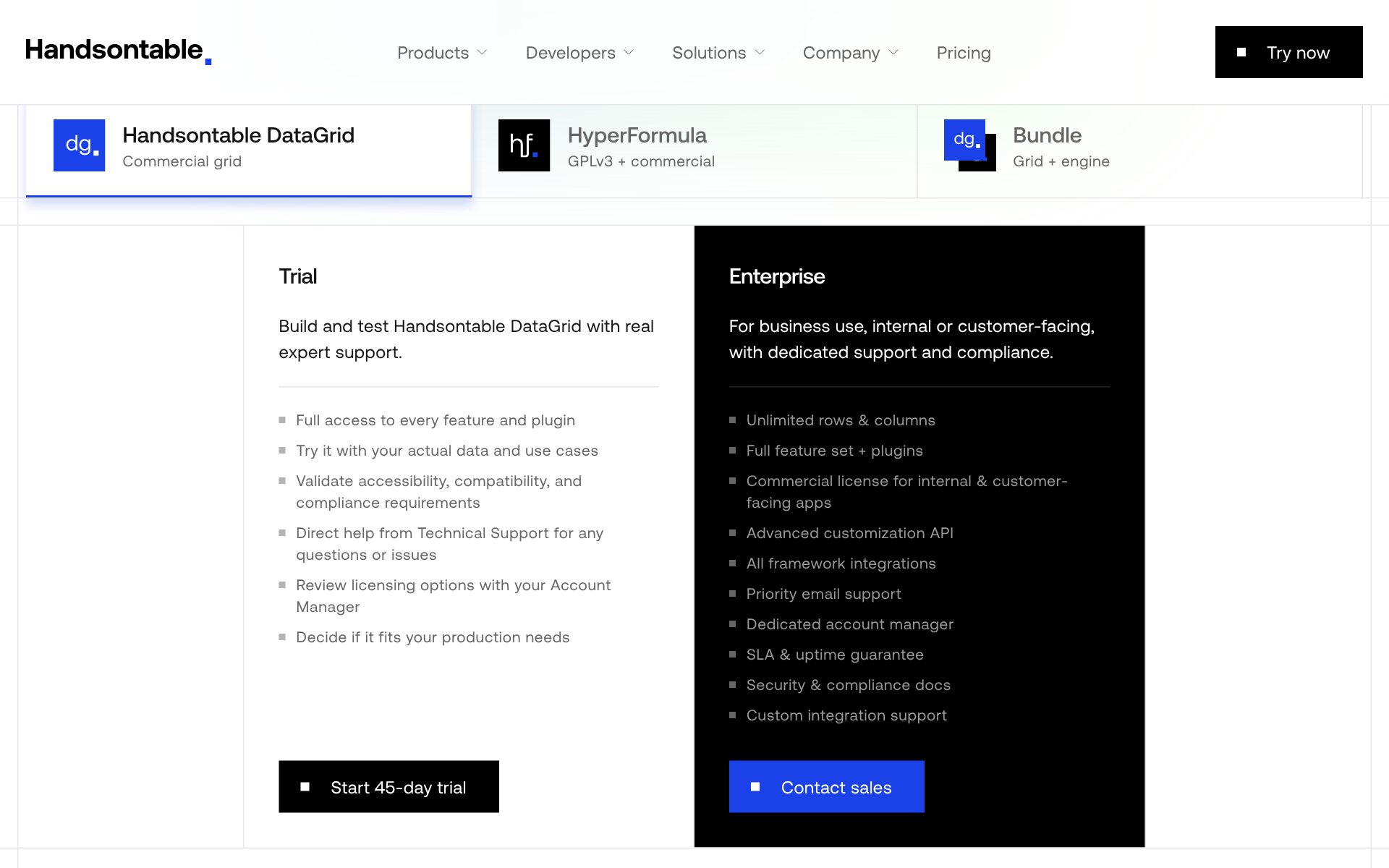
For the data grid, the pricing page offers two routes:
- Trial: a 45 day trial with full access to every feature and plugin, direct help from technical support, and a licensing review with an account manager.
- Enterprise: a commercial licence for internal and customer facing applications, with all framework integrations, priority email support, a dedicated account manager, an SLA, and security and compliance documents. The call to action is "Contact sales".
So how much does Handsontable cost? The honest answer is that you have to ask. The FAQ on the pricing page puts it in one line:
By the number of end users of the applications you build with it. Contact the Sales Team for a quote for your project.
That is a different model from most commercial grids. AG Grid, for example, charges per front end developer (see our AG Grid pricing breakdown). A per developer price is fixed once you know your team size. A per end user price grows with the success of your product, so the figure you are quoted today depends on the user count you give the sales team, and you should ask what happens when that count changes.
What Handsontable has charged before
Handsontable's pricing has changed shape more than once, which is part of why search results disagree with each other. Third party sources recorded per developer prices earlier in 2026:
- The price tracker PricingSaaS logged the pricing page listing a Standard plan at $999 and a Priority plan at $1,299 in early March 2026.
- Resellers such as ComponentSource have listed per developer, one year subscriptions close to those figures, with minimum quantities, and perpetual licences as quote only.
Treat those numbers as history and as a rough order of magnitude, not as a current quote. Handsontable's own site now says the licence is priced by end users, and it does not publish a figure. If an older blog post or a reseller page shows a per developer price, check it against a written quote from Handsontable before it goes into a budget.
Handsontable licence types explained
Handsontable's software licence documentation lists two licences, and both are proprietary.
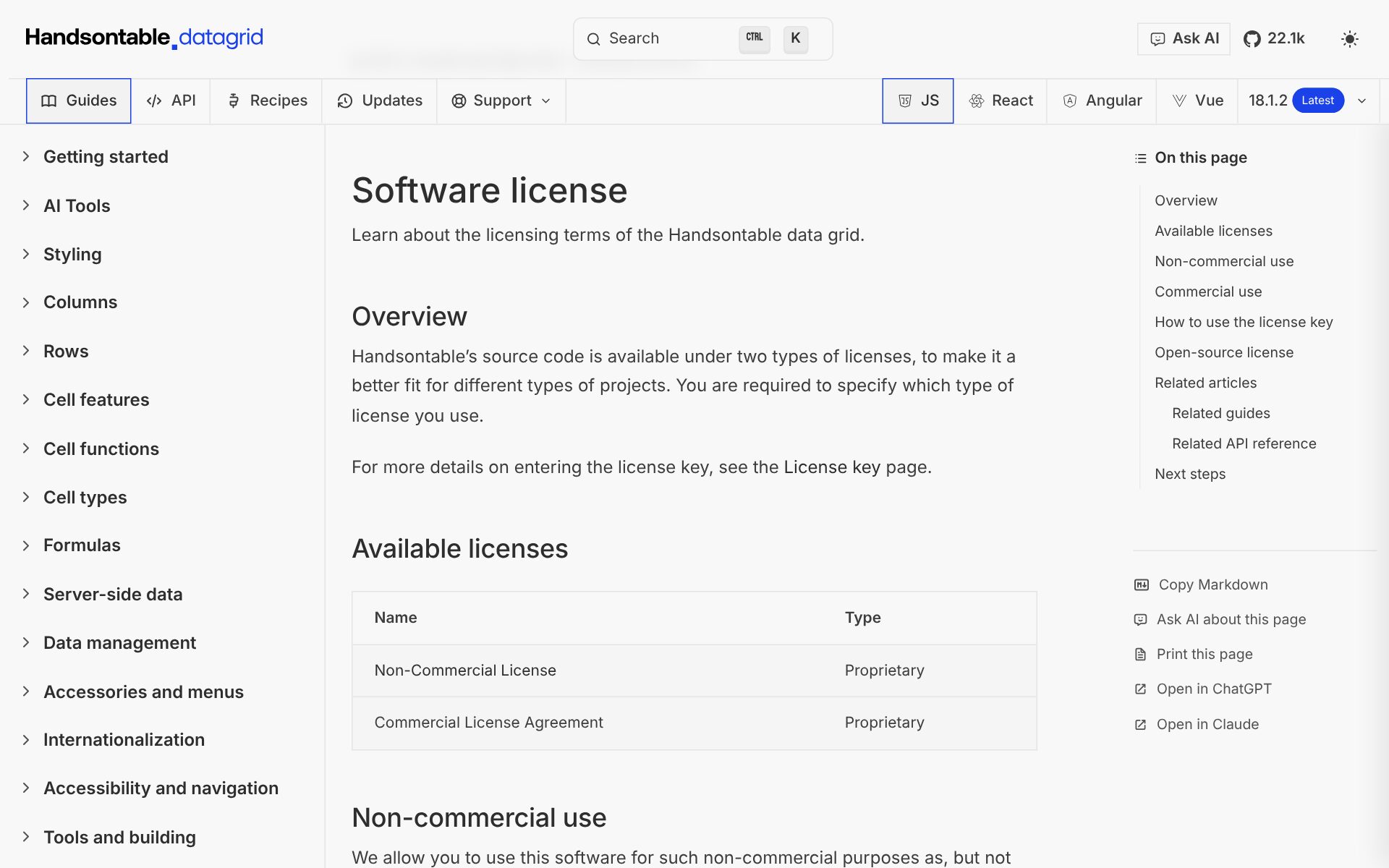
| Licence | Cost | What it allows | Key you pass |
|---|---|---|---|
| Non-Commercial and Evaluation | Free | Teaching, academic research, private study, evaluation, testing and experimentation. In a commercial setting, only the evaluation, development and testing tiers. | non-commercial-and-evaluation |
| Trial | Free for 45 days | Full feature evaluation with technical support. | A time limited trial key |
| Commercial subscription | Quote from sales, priced by end users | Production use in internal or customer facing applications for the subscription term. | A commercial key with an expiry date |
| Commercial perpetual | Quote from sales, priced by end users | Production use of every version released while your support plan was active, with no end date. | A commercial key with a maintenance date |
| Tabulator | Free (MIT) | Any use, including commercial production, by any number of developers and end users. | None |
Subscription vs perpetual
The difference matters most on the day the licence lapses. Handsontable's FAQ says a subscription licence expires at the end of its term unless you renew it, and its licence key documentation is direct about the consequence: once a subscription expires, you can no longer use Handsontable. A perpetual licence does not expire. You keep every version released while your support plan was active, and renewing the plan restores updates and support.
If you are quoted a subscription, your grid becomes a recurring cost for as long as the application lives. If long term cost matters, ask for a perpetual quote as well and compare the two over the expected life of the product.
Support plans
Every commercial licence includes one of three support plans: Maintenance, Standard or Premium. According to Handsontable's support page, Maintenance covers community channels and security patches only. Standard adds email support with a response time of two business days. Premium adds a one business day response, a dedicated account manager and technical consultant, a private Slack channel, and calls. Which plan you get depends on your licence type and contract, so it is one more line to check on the quote.
Is Handsontable free?
Only for non-commercial use and evaluation. The documentation describes the free licence as covering purposes "not intended toward monetary compensation such as, but not limited to, teaching, academic research, evaluation, testing and experimentation". For companies it adds a clear limit:
Your use in commercial settings is strictly limited to evaluation, development and testing tier of a software deployment architecture. In other words, you can't enter the production stage if your project is in any way connected with your commercial activity.
In practice that means:
- A student project, a research tool or a personal experiment: free, with the
non-commercial-and-evaluationkey. - A prototype or staging build at a company: free while you evaluate.
- An internal admin tool in production at a company: needs a commercial licence.
- A SaaS product with paying customers: needs a commercial licence.
The licence text in the GitHub repository adds one more condition that applies in every case: you must not use the software to develop something that may be considered competitive with it.
Is Handsontable open source?
Not any more. The source is published on GitHub, but the licence is proprietary. Handsontable's own documentation gives the history: it was released under the MIT licence for many years, and the last version available under those terms was 6.2.2, released on December 19, 2018. The 7.0.0 release notes from 2019 describe the change as moving from "open source" to "source-available", with the MIT licence replaced by a custom licence that is free for non-commercial use. The same release merged the old Community Edition and Pro into one product.
This is why people still search for a "Handsontable Community Edition". There is no separate community edition today. You can still install 6.2.2 under MIT, but it is a version from 2018 with no fixes, no modern framework wrappers and none of the features added since. It is a poor base for a new project.
How the Handsontable licence key works
Handsontable requires you to state which licence applies by passing a key in the grid configuration. For non-commercial use it is a fixed string:
const hot = new Handsontable(container, {
  data,
  licenseKey: "non-commercial-and-evaluation",
});
For commercial use you pass the key issued to you. The licence key documentation describes what users see when the key is wrong, and it is worth reading before you ship:
| Key state | What happens |
|---|---|
| Missing or invalid key | A modal that cannot be closed covers the grid, and the message repeats in the console. The grid is not usable until a valid key is passed. |
| Trial key, during the trial | The grid shows a Handsontable badge in its top left corner, and the console warns how many days remain. |
| Trial key, after expiry and the grace period | A blocking screen replaces the grid. |
| Expired subscription key | The console reports an error. The grid keeps working and shows no message, but you are no longer licensed to use it. |
| Perpetual key on a version released after its maintenance date | A notice appears below the table and the console reports an error. Older versions keep working without a notice. |
| Valid commercial key or the non-commercial key | No notice and a quiet console. |
Validation happens in the browser. Handsontable says the grid makes no connection to a licence server, so it works offline and in air gapped environments. The operational cost is the key itself: it has to be present in every environment that renders the grid, and a build that loses it shows your users a blocked table.
Handsontable DataGrid, HyperFormula and the Bundle
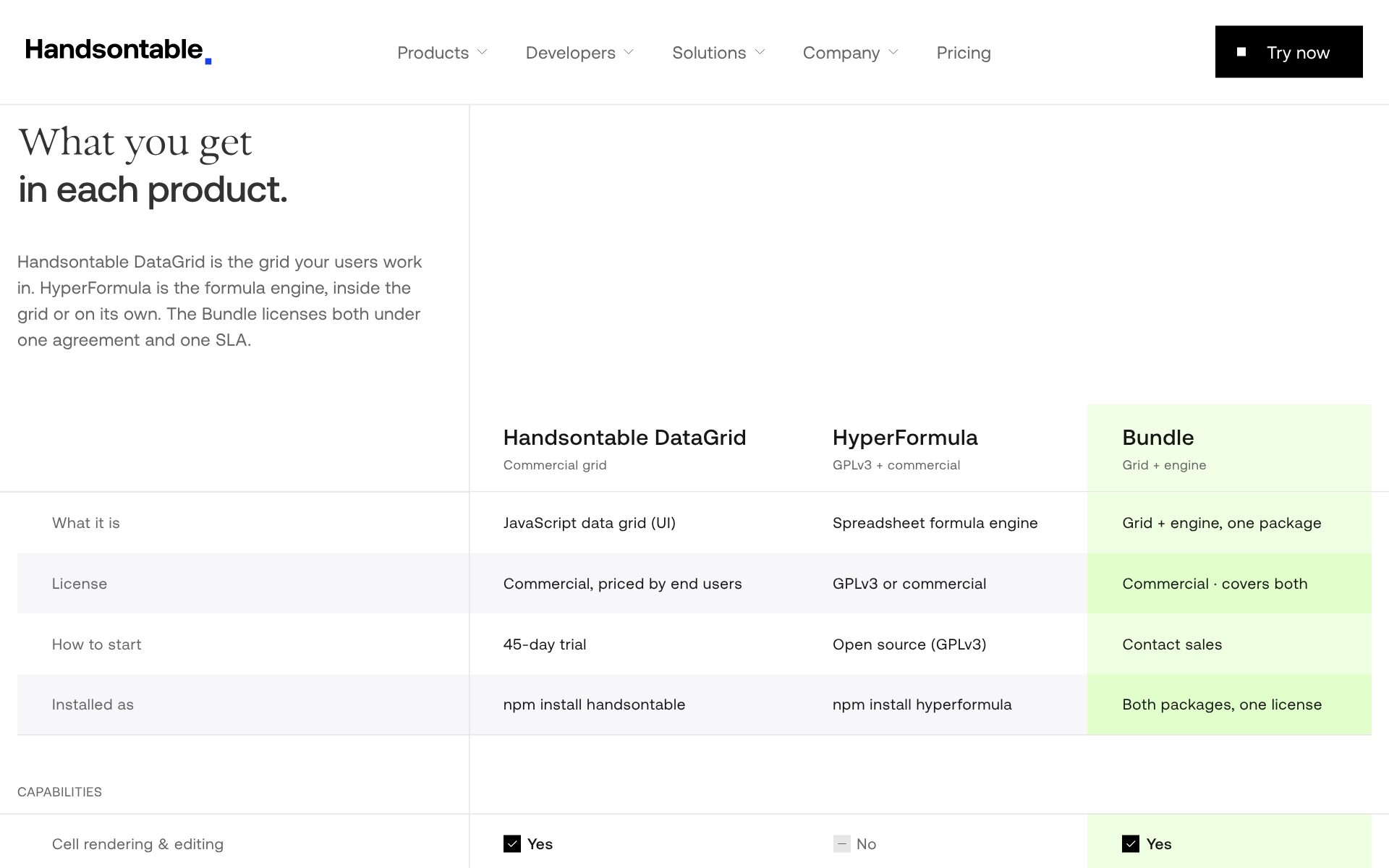
Formulas are the reason many teams look at Handsontable, so the split between the products affects the price.
| Product | What it is | Licence | How to start |
|---|---|---|---|
| Handsontable DataGrid | The grid UI: cell rendering and editing, keyboard navigation, virtualisation, React, Angular and Vue wrappers | Commercial, priced by end users | 45 day trial |
| HyperFormula | A headless formula engine with about 400 Excel compatible functions | GPLv3 or commercial | Open source under GPLv3 |
| Bundle | The grid, the wrappers and the HyperFormula integration, with a year of updates and support | Commercial, covers both | Contact sales |
HyperFormula is free in a non-commercial or open source project under GPLv3, with gpl-v3 as its licence key. Handsontable's FAQ says any other project needs a commercial HyperFormula licence, and that it is licensed separately from the data grid. If your spec includes user entered formulas, ask for the Bundle price and not only the grid price.
Questions to ask before you request a quote
Because the price is a conversation, the quality of your questions decides how predictable your cost is. Get the answers in writing.
- How do you count end users? Named accounts, monthly active users, or everyone who could open the page? Does it include free tier users of a SaaS product?
- What happens when the user count grows? Is there a band, an automatic uplift, or a true up at renewal?
- Is the quote a subscription or a perpetual licence? What is the renewal price in years two and three?
- Which support plan is included? Maintenance, Standard or Premium, and what does an upgrade cost?
- Does it cover every application and environment? One product or several, plus staging and customer hosted deployments?
- Is HyperFormula included? Or do formulas need the Bundle?
- What are the terms if we stop paying? For a subscription, you must stop using the grid, so plan the exit before you sign.
Handsontable does not offer refunds (its FAQ says so and points buyers to the free evaluation licence), so finish your evaluation during the trial.
Is Handsontable worth the price?
It can be. Handsontable is a mature product with a real spreadsheet feel, and for some specs it is the shortest path. It is a good purchase when:
- Users must type formulas such as
=SUM(B2:B9)and expect Excel compatible results. HyperFormula is built for that. - You need a vendor contract: an SLA, security and compliance documents, a signed DPA or source code escrow.
- The application has a small, known set of end users, so a per end user price stays modest.
- You are building on Salesforce, where Handsontable ships a reference Lightning Web Component.
It is a harder sell when:
- You need a number for a plan today. There is no public price to put in the spreadsheet.
- Your product has many end users or is growing quickly, because the price is tied to that count.
- You only need spreadsheet style editing, range selection and copy and paste, without formulas.
- You are an agency, an open source project or an early stage startup that cannot take on a sales led licence for a UI component.
- You want to avoid a licence key that can block the grid in production if it goes missing.
A free Handsontable alternative: Tabulator
Tabulator is an MIT licensed JavaScript data grid with no dependencies, no paid tier and no licence key. It is free for commercial production use by any number of developers and end users. It works with plain JavaScript and with React, Vue, Angular and Svelte. Try it: sort a column, edit a cell, page through the data.
For the Excel style use case, Tabulator has a spreadsheet mode with lettered columns, numbered rows, multiple sheets with tabs, cell range selection and copy and paste to and from Excel. This configuration is the whole setup:
const table = new Tabulator("#sheet", {
  spreadsheet: true,
  spreadsheetRows: 50,
  spreadsheetColumns: 26,
  spreadsheetSheetTabs: true,           // tabs for multiple sheets
  spreadsheetSheets: [
    { title: "Budget", key: "budget", data: [["Item", "Cost"], ["Hosting", 120]] },
    { title: "Forecast", key: "forecast", data: [] },
  ],

  selectableRange: true,                // drag to select cell ranges
  selectableRangeColumns: true,
  selectableRangeRows: true,
  selectableRangeClearCells: true,

  editTriggerEvent: "dblclick",
  editorEmptyValue: undefined,
  columnDefaults: { editor: "input", headerSort: false },

  clipboard: true,                      // copy and paste ranges
  clipboardCopyRowRange: "range",
  clipboardPasteParser: "range",
  clipboardPasteAction: "range",
});

// Read the data back as arrays, ready to save
const sheets = table.getSheetDefinitions();
Here is how the two compare on the things that usually appear in a spec:
| Feature | Handsontable DataGrid | Tabulator |
|---|---|---|
| Licence | Proprietary, commercial licence for production | MIT |
| Price | Quote from sales, priced by end users | Free |
| Licence key | Required, missing key blocks the grid | None |
| Cell editing and validation | Yes | Yes (editing, validation) |
| Cell range selection | Yes | Yes (range selection) |
| Copy and paste with Excel | Yes | Yes (clipboard) |
| Multiple sheets | Not listed on its product comparison | Yes, with tabs (spreadsheet mode) |
| Formulas | Yes, through HyperFormula (licensed separately) | No cell formulas. Column calculations for totals |
| Row and column virtualisation | Yes | Yes (virtual DOM) |
| Grouping, tree data, pagination | Check its docs for your case | Yes (grouping, tree data, pagination) |
| Export | Check its docs for your case | CSV, JSON, XLSX and PDF (downloads) |
| Frameworks | React, Angular and Vue wrappers | React, Vue, Angular, Svelte or none |
| Vendor support | Maintenance, Standard or Premium plan | Community, plus optional commercial support |
The Handsontable column reflects its pricing page, FAQ and documentation. Where we could not confirm a detail from those pages, the table says to check its docs.
What Tabulator does not have: a formula engine. Its spreadsheet module does not support cell based formulas, and in spreadsheet mode it cannot be combined with grouping, pagination or column calculations. If users writing formulas is a core requirement, Handsontable with HyperFormula is built for it, and the JavaScript spreadsheet library comparison lists other formula capable options, including MIT licensed ones. If the requirement is an editable grid that feels like Excel and hands back clean data, Tabulator covers it at no cost. The editable table guide walks through editors, validation and saving changes, and the React spreadsheet component comparison has a tested React component for spreadsheet mode.
If your team needs a support contract, Tabulator offers optional commercial support. The library and every feature in it stay free either way.
Frequently asked questions
How much does Handsontable cost?
Handsontable does not publish a price as of November 2026. Commercial licences are quoted by its sales team, and its FAQ says the price depends on the number of end users of the applications you build. Earlier in 2026, third party trackers recorded per developer plans from $999, but those figures are no longer on Handsontable's pricing page.
Is Handsontable free to use?
Only for non-commercial purposes such as teaching, research, evaluation and testing, using the non-commercial-and-evaluation licence key. Production use connected to commercial activity needs a paid commercial licence.
Is Handsontable free for commercial use?
No. A company can evaluate, develop and test with the free key, but Handsontable's licence says you cannot enter the production stage if the project is connected with your commercial activity.
Is Handsontable open source?
No. The source code is visible on GitHub, but the licence has been proprietary since version 7.0.0 in 2019. The last MIT licensed version is 6.2.2, released on December 19, 2018.
Does the Handsontable licence expire?
A subscription licence expires at the end of its term unless renewed, and you must stop using the grid when it does. A perpetual licence does not expire: you keep every version released while your support plan was active.
What happens if I do not set a Handsontable licence key?
Handsontable covers the grid with a modal that cannot be closed and logs a message in the console. The grid is not usable until you pass a valid commercial key or the non-commercial key.
Is HyperFormula included with Handsontable?
The grid has a built in HyperFormula integration, but HyperFormula is licensed separately under GPLv3 or a commercial licence. The Bundle licenses the grid and the engine together.
What are some alternatives to Handsontable?
For a free, MIT licensed grid with spreadsheet style editing, range selection and clipboard support, use Tabulator. For formula support, look at FortuneSheet or Univer. For a commercial grid priced per developer, look at AG Grid Enterprise. Each is covered in the spreadsheet library comparison and the AG Grid alternatives guide. For commercial suites such as Syncfusion, Kendo UI and DevExtreme, see the Syncfusion alternatives guide.
Get started with Tabulator
If you cannot wait for a quote, or the price does not fit the project, try Tabulator first. Follow the install guide, open the spreadsheet example, or read the side by side Tabulator vs Handsontable page. For a wider view of the market, see the best JavaScript table libraries. The source is on GitHub.